

4 Basic Account Setup Steps for Facebook Ads That Every E-com Owners Should Know Before 2025 Ends
A Knowledge Base of Exclusive Guide For E-com owners & Marketers

People Often Take Facebook Ads Lightly – Most E-com Owners Take it Casually Basics That Can Cost You Dollars!
Imagine you’re running a home-based food business. You’ve invested in a machine, raw materials, hired staff—everything seems set. But there’s a problem: you don’t know how to operate the machine efficiently in a better way You don’t understand the basic steps needed to make it work. So, you hire someone who claims they are experts.
But wait—how do you know if this person is honest?
Are they truly reliable?
Can you blindly trust them with your investment?
The same applies to Facebook Ads. Facebook Ads is a powerful sales and lead generation machine, capabillity to work on your ROAS, Low CPM but only if you know how to use it properly. You can’t just throw money into ads and expect magic to happen.
Just like your food business, you need to understand the fundamentals first.
I hope you’re finding the right way!

Why Learning Facebook Ads Basics Matters
Before you even think about outsourcing your Facebook Ads, don’t you think it’s important to understand the basics yourself?
You don’t have to be an expert, but knowing the foundational steps can save you from unnecessary losses and mistakes. You wouldn’t want to rely entirely on someone else without understanding what’s happening, right?
That’s why we’re here to help. Kumba.AI is dedicated to helping eCommerce store owners create high-quality product video ads and compelling social media ad copies that engage their audience effectively. This is your foundation, your starting point.
Our Goal: Boosting your online presence with Kumba AI. Our smart technology streamlines the process of magnifying your exposure exponentially across your e-commerce platform, blog, and website.
Once you understand the importance of content and creative strategy, the next step is setting up your Facebook Ads properly.
Without the right setup, even the best ads won’t perform well. So, let’s dive into the four essential setup steps every eCommerce business owner must complete before running Facebook Ads in 2025.
4 Basic Facebook Ads Setup Steps
1. Set Up Your Business Manager
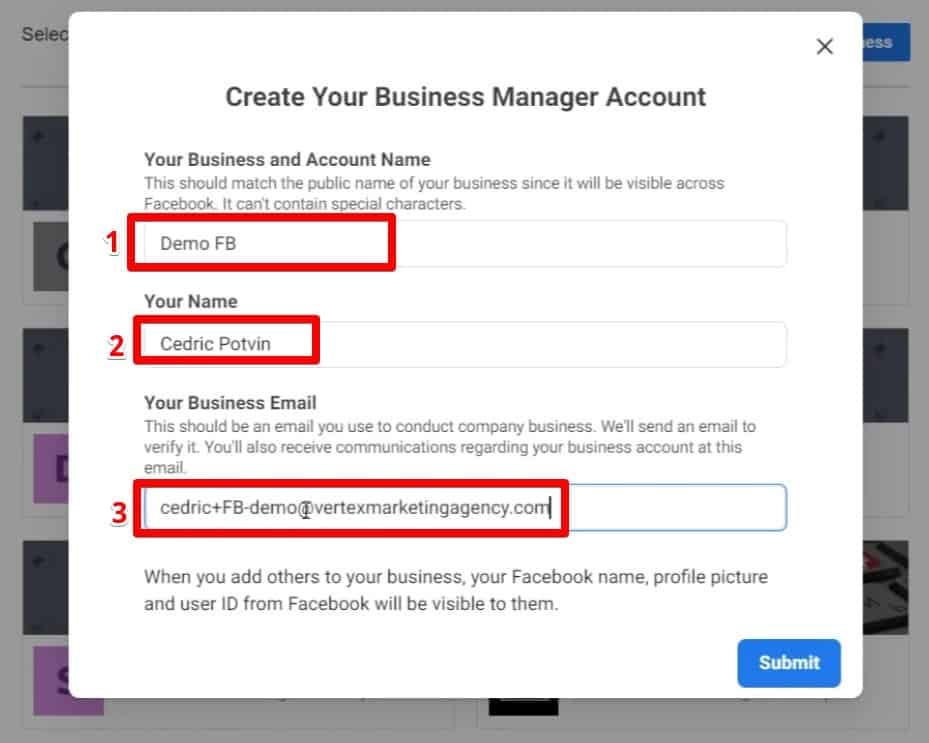
Business Manager is the control center for your Facebook Ads. It helps keep your ad accounts, pages, and team access organized in one place.
Here’s what you need to do:
✅ Go to business.facebook.com and create an account.
✅ Add your business details and assign roles to your team.
✅ Link your Facebook Page and Ad Account for smooth management.
Without Business Manager, your ads might not run effectively, and managing your campaigns will become a nightmare. 😨
2. Install and Verify Facebook Pixel
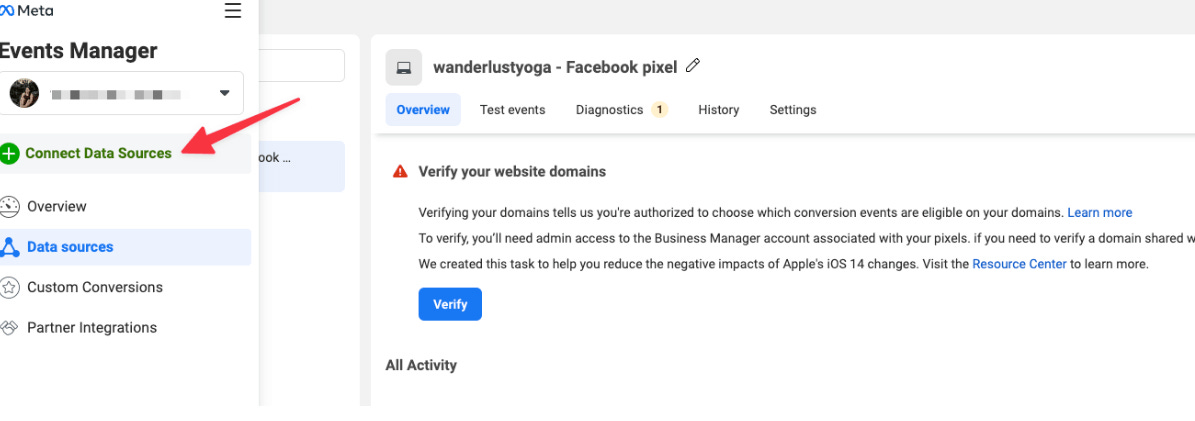
Facebook Pixel is your tracking tool. It collects data on how users interact with your website, helping you optimize your ads and retarget the right audience. To set it up:
Go to Events Manager in Facebook Business Manager.
Create a new Pixel and install the Pixel code on your website.
Use Facebook’s Pixel Helper Chrome extension to verify if it's working properly.
A missing or incorrectly installed Pixel means you’re losing out on valuable data and potential sales.
3. Verify Your Domain in Business Manager
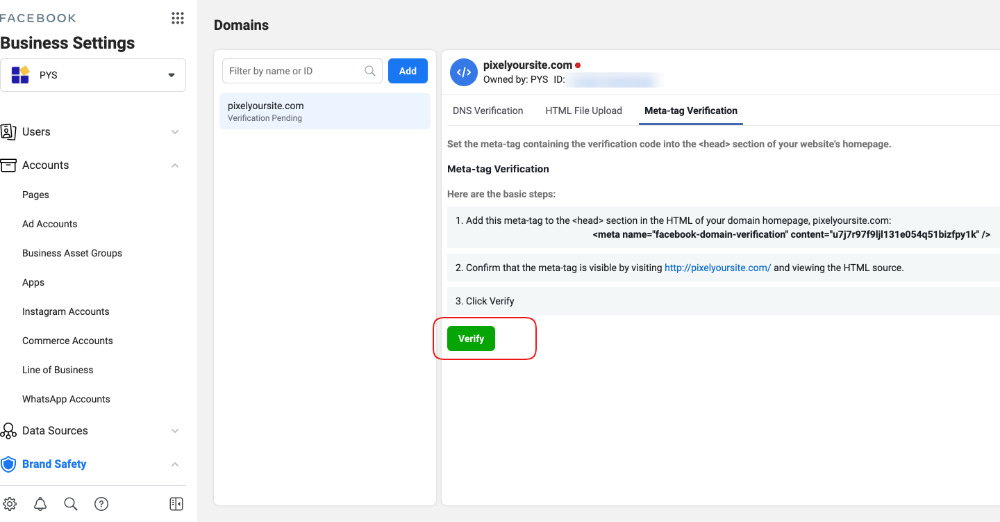
Facebook requires domain verification to ensure you're the legitimate owner of the website linked to your ads. This step also prevents unauthorized parties from running ads under your domain. Here’s how:
✅ In Business Manager, go to Brand Safety > Domains.
✅ Add your website domain and verify it using the provided DNS or HTML verification method.
Without domain verification, you might face ad disapprovals 🚫 and reduced control over your campaigns.
4. Configure Aggregated Event Measurement (AEM)
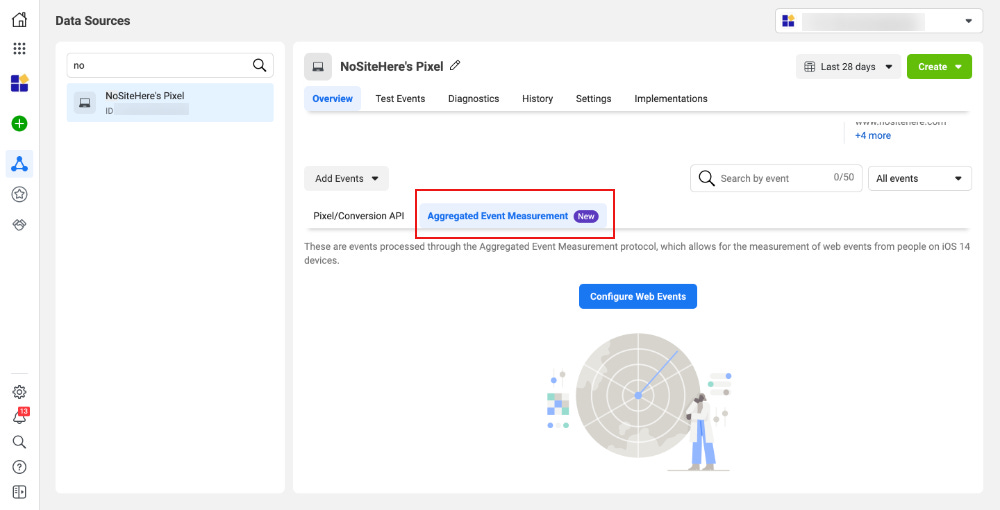
With Apple’s iOS 14+ updates, Facebook introduced Aggregated Event Measurement (AEM) to help advertisers track conversions effectively despite privacy restrictions. To configure AEM:
✅ Go to Events Manager and select your verified domain.
✅ Set up and prioritize conversion events (like Add to Cart 🛒, Purchase 🛍️, etc.).
Without AEM, your ad tracking and optimization will be severely impacted, leading to poor ad performance and wasted budget. 😞
Final Thoughts
Setting up Facebook Ads correctly isn’t an option—it’s a necessity. If you don’t follow these foundational steps, you risk losing money, valuable data, and potential customers. Before spending a single dollar on Facebook Ads, make sure your setup is solid.
Once your setup is done, you can focus on creating high-quality content and compelling ad copies that convert. And if you need help with that, Kumba.AI is here to support you in crafting the best ads that engage and sell.
So, before 2025 ends, make sure your Facebook Ads setup is done right. Your business deserves it.